


How to Use an OBD2 Scanner: Read Check Engine Codes Step by Step
Learn how to connect an OBD2 scanner, save stored, pending and permanent codes, review freeze-frame data, check readiness and clear codes safely.
Read the guide
Media 1 of 8
Confirm vehicle compatibility before ordering
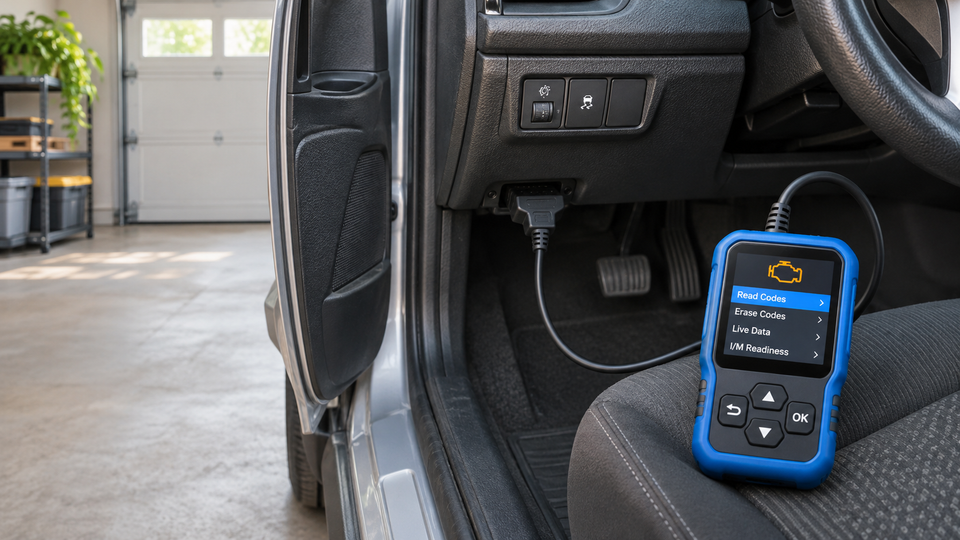
Read and clear supported engine-related OBD II trouble codes, view live data and check emissions readiness without requiring a separate battery. This compact scanner is designed for drivers who want clearer information before deciding what to inspect or discuss with a qualified technician.
The scanner is designed for supported OBD II-compliant cars, SUVs and light trucks. The current product information lists CAN, ISO9141-2, KWP2000, J1850 PWM and J1850 VPW protocols.
Compatibility varies by vehicle year, make, model, engine and sales market. Before ordering, confirm that your vehicle is OBD II-compliant and uses one of the supported protocols. If you are unsure, contact us with your vehicle year, make, model, engine and country.
Designed for OBD II-compliant cars, SUVs and light trucks. The current product information lists CAN, ISO9141-2, KWP2000, J1850 PWM and J1850 VPW protocols and describes compatibility with most supported vehicles from model year 1996 onward.
Compatibility varies by make, model, model year and market. The product information confirms engine and emissions diagnostics only; it does not confirm ABS, SRS, transmission, diesel, heavy-duty, hybrid or EV coverage. If you are unsure, contact support with your vehicle year, make, model, engine and country before ordering.
Clearing a code does not repair the underlying fault and can reset emissions readiness monitors.
The scanner is powered through the vehicle's OBD2 port and does not require a separate battery.
Processing: 1-3 business days; US: 7-12 business days after dispatch; international: 7-15 business days after dispatch
Clear, practical return support
Promotional prices are shown automatically on eligible products. Review compatibility and choose the configuration you need before ordering.
Starts
Selected products only. Promotional prices are shown on product pages; exclusions or order requirements may apply.
Watch product demos and customer-submitted clips before choosing your setup.
Check coverage before ordering and treat every trouble code as a diagnostic starting point.
It is designed for OBD II-compliant cars, SUVs and light trucks and supports the protocols listed on this page. Compatibility still varies by make, model, model year, engine and sales market. Contact support with those details before ordering if you are unsure.
The current product information confirms engine and emissions-related OBD II diagnostics. It does not confirm ABS, airbag/SRS, transmission or manufacturer-specific module coverage.
No separate battery is required. The scanner is powered through your vehicle's OBD2 diagnostic port.
The scanner can clear supported engine codes, but clearing a code does not repair the cause of the warning. Record the code and freeze-frame data first, address the underlying issue, and seek qualified help for flashing warning lights or safety-related symptoms.
Learn what a basic OBD2 scanner can read, what it cannot diagnose and what to record before clearing a code.
Fitment checks, honest limitations and practical setup steps
Learn how to connect an OBD2 scanner, save stored, pending and permanent codes, review freeze-frame data, check readiness and clear codes safely.
Read the guide
Learn what an OBD2 scanner can—and cannot—tell you about a check-engine light, including codes, live data, freeze-frame information, readiness monitors, and safe next steps.
Read the guideSwipe to explore more guides