

Quick answer: An OBD2 scanner can read the diagnostic trouble code behind a check-engine light, show available live engine data, display freeze-frame information, and check emissions-readiness monitors. It cannot prove which part has failed or replace a complete diagnosis. The smartest use is to turn a vague warning light into a focused list of systems to inspect.
When the check-engine light appears, an OBD2 scanner for check engine light diagnostics can help you understand what the vehicle computer detected before you decide what to do next. This practical 2026 guide explains how OBD2 scanners work, which features matter for everyday drivers, and where a basic code reader reaches its limits.
What does an OBD2 scanner actually do?
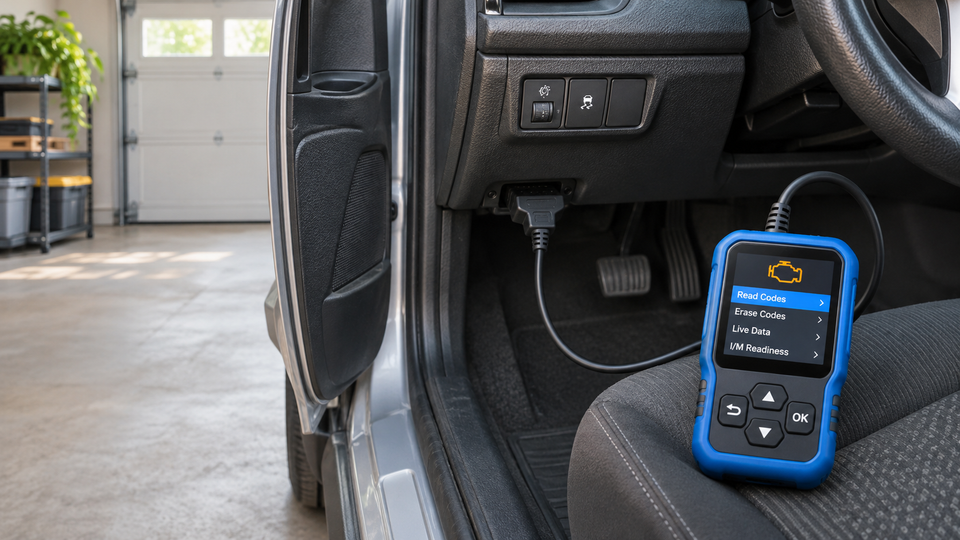
OBD2 stands for On-Board Diagnostics, second generation. A compatible scanner connects to the diagnostic port—usually below the dashboard—and communicates with the vehicle computer. At the basic level, it retrieves standardized diagnostic trouble codes, often called DTCs, related to engine and emissions systems.
A code is a clue, not a verdict. For example, a catalyst-efficiency code describes a monitored condition; it does not prove the catalytic converter is the only possible cause. Wiring, sensors, exhaust leaks, misfires, fuel-control problems, or other conditions may need inspection before parts are replaced.
Steady vs. flashing check-engine light
- Steady light: The vehicle computer has detected a fault. If the car otherwise drives normally, read the code promptly and follow the vehicle manual.
- Flashing light: Treat this as urgent. It can indicate a severe misfire or another damaging condition. Reduce load, move to a safe place, switch off the engine when appropriate, and seek qualified help.
A scan should never delay action when the vehicle is overheating, losing oil pressure, smoking, making severe noises, or showing a brake, airbag, or other safety warning.
The five most useful scanner functions
1. Read diagnostic trouble codes
This is the essential function. Generic powertrain codes typically begin with “P,” while the remaining characters narrow the affected system and condition. Save every stored, pending, and permanent code before changing anything; one symptom can produce several related codes.
2. View freeze-frame data
Freeze-frame data is a snapshot of operating conditions when a fault was recorded. Depending on the vehicle, it may include engine speed, coolant temperature, vehicle speed, calculated load, and fuel-trim values. This context can help distinguish a cold-start problem from one that appears at highway speed or under load.
3. Monitor live data
Live data shows supported sensor values while the engine runs. Common examples include RPM, coolant temperature, oxygen-sensor information, throttle position, intake readings, and short- or long-term fuel trim. It is most useful when you know the normal range for that vehicle and condition.
4. Check I/M readiness
Inspection and Maintenance readiness shows whether emissions monitors have completed their self-tests. Clearing codes or disconnecting the battery can reset these monitors to “not ready.” The vehicle may need specific drive cycles before the tests complete again, so check readiness before an emissions inspection.
5. Clear supported engine codes
Clearing codes turns off the warning light only if the fault does not return, and it may erase useful freeze-frame information and reset readiness monitors. Record the codes first. Clear them only after the issue has been addressed or when a diagnostic procedure calls for it—not simply to hide a warning.
Code reader vs. full-system scan tool
| Feature | Basic OBD2 reader | Advanced scan tool |
|---|---|---|
| Generic engine/emissions codes | Usually supported | Supported |
| Live data and freeze frame | Often supported | Usually deeper and graphable |
| ABS, airbag, transmission, body modules | Usually not included | Varies by tool and vehicle |
| Service resets | Usually limited or absent | May include oil, battery, EPB, SAS and more |
| Bidirectional tests and coding | No | Available on selected professional tools |
Buy for the systems you need, not for the longest feature list. If your goal is to understand a check-engine light, a handheld reader with codes, live data, freeze frame, and readiness may be enough. For ABS, airbag, transmission, battery registration, or active tests, confirm exact make, model, year, and module coverage before purchasing.
How to choose an OBD2 scanner in 2026
- Vehicle compatibility: Confirm the model year, make, engine, sales market, and supported protocols. “OBD2 compatible” does not guarantee access to every module.
- Diagnostic depth: Decide whether you need engine-only diagnostics or full-system coverage.
- Live-data usability: Look for clear labels, units, fast refresh, and graphing if you plan to compare sensors.
- Updates: Check whether updates are free, subscription-based, or limited to a set period.
- Format: A handheld wired unit is simple and phone-independent. Bluetooth adapters are compact but depend on compatible apps and permissions.
- Support: Clear instructions and responsive support matter when compatibility is uncertain.
How to use an OBD2 scanner safely
- Park on a level surface, apply the parking brake, and follow the scanner and vehicle instructions.
- Locate the OBD2 port, commonly under the dashboard near the steering column.
- Set the ignition as directed and connect the cable firmly without forcing the plug.
- Enter requested vehicle information or allow automatic protocol detection.
- Read stored, pending, and permanent codes. Photograph them and the freeze-frame data before clearing anything.
- Research the code together with symptoms and service information. Inspect simple causes only when relevant.
- If the vehicle is safe to operate, compare live data under controlled conditions. Never watch a scanner while driving; use a passenger or data logging.
Common mistakes to avoid
- Replacing the part named in a code description without testing the circuit and system.
- Clearing codes before saving freeze-frame and readiness information.
- Assuming a basic reader can diagnose ABS, airbags, transmission, hybrids, EV systems, or manufacturer-specific modules.
- Ignoring multiple codes without considering a shared cause.
- Continuing to drive with a flashing check-engine light or serious symptoms.
A straightforward scanner for everyday engine checks
Car Gadget Store's OBD2 Scanner for Check Engine Codes & Live Data is a compact handheld unit powered from the vehicle's diagnostic port. Current product information confirms support for reading and clearing supported engine-related codes, live data, freeze-frame information, emissions readiness, and available vehicle information. It lists CAN, ISO9141-2, KWP2000, J1850 PWM, and J1850 VPW protocols.
Its confirmed scope is engine and emissions-related OBD2 diagnostics. ABS, airbag/SRS, transmission, diesel, heavy-duty, hybrid, EV, and manufacturer-specific module coverage has not been confirmed. Check compatibility for your vehicle before ordering.
Frequently asked questions
Can an OBD2 scanner tell me exactly what is wrong?
No. It reports codes and data associated with a detected condition. Those results narrow the search, but testing and service information are still needed to identify the root cause.
Will an OBD2 scanner work on every car?
No. Compatibility depends on vehicle year, market, protocol, and the systems the tool supports. Coverage beyond standardized engine diagnostics varies widely.
Can I clear a check-engine light with an OBD2 scanner?
Many scanners can clear supported engine codes, but the light will return if the fault remains. Clearing may also reset readiness monitors, so save the diagnostic information first.
Can an OBD2 scanner read ABS or airbag codes?
A basic engine-code reader usually cannot. You need a tool that specifically lists ABS or SRS coverage for your exact vehicle.
Should I drive with a flashing check-engine light?
A flashing light can indicate a severe condition. Reduce load, move to a safe location, follow the vehicle manual, and seek qualified assistance.
Bottom line
An OBD2 scanner is most valuable when it helps you collect accurate information before spending money or clearing evidence. Choose the coverage your vehicle and goals require, record codes and freeze-frame data, and remember: a trouble code identifies where to investigate—not automatically which part to replace.